
Best Wearables for AlvoTriX in 2026: Core vs Gateway Device Guide
AlvoTriX is the AI safety layer that turns a wearable into a guardian — reading heart rate, oxygen and motion to alert your family automatically. It runs on the device you choose. Here is how to pick the right one, with recommended models and prices.
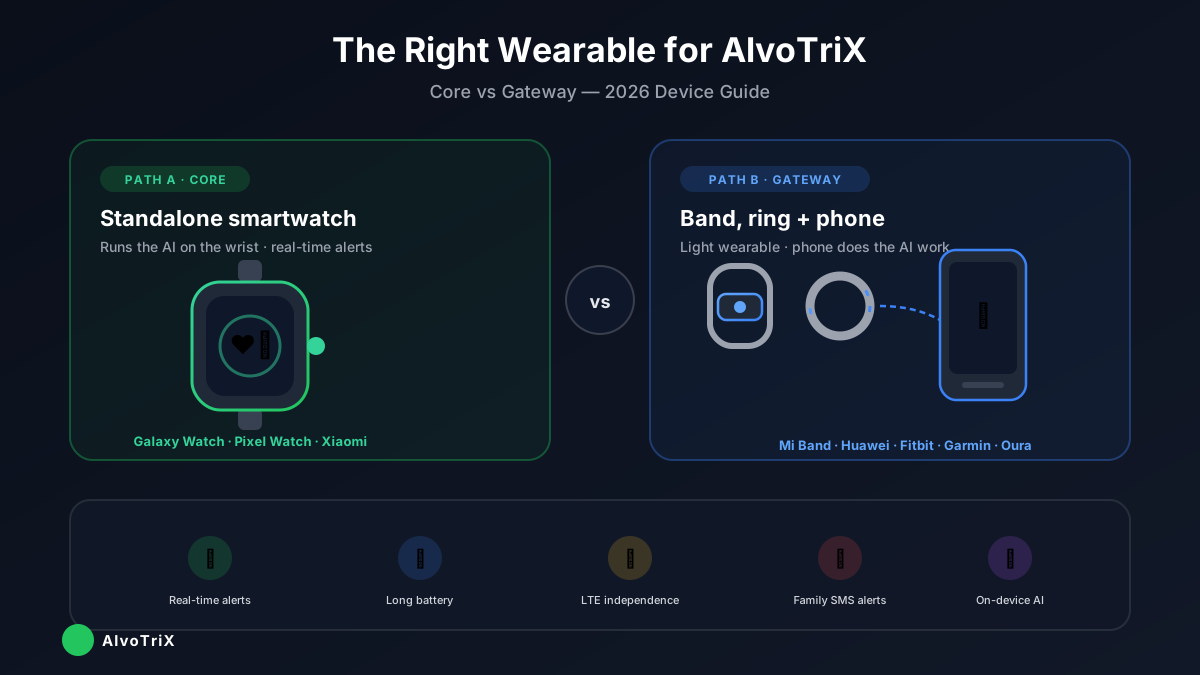
AlvoTriX is the AI safety layer that turns an ordinary wearable into a guardian — reading heart rate, blood oxygen and motion to alert your family automatically when something is wrong. The crucial detail most people miss: AlvoTriX runs on the device you already choose. There is no proprietary AlvoTriX hardware to buy. So the real question is not "which gadget do I buy?" but "which wearable do I put on the wrist, and does AlvoTriX run on the watch itself or through a paired phone?" This guide answers exactly that, with recommended models and 2026 price ranges.
- The one decision that determines everything: Core (on the watch) vs Gateway (on a phone)
- Recommended standalone smartwatches — Samsung Galaxy Watch, Pixel Watch, Xiaomi and more
- Recommended bands & smart rings — Mi Band, Huawei, Fitbit, Garmin, Oura
- Buying checklists, latency trade-offs, and the devices that are not supported
Start Here: Which Path Is Yours — Core or Gateway?
Every AlvoTriX setup needs one foundation — Core or Gateway — the free AlvoTriX app. Which one you need is decided entirely by the device on the wrist.
The difference is simple. Core installs the AlvoTriX agent directly on an Android smartwatch — the watch reads its own sensors, runs the AI on-device, and dispatches alerts on its own, even with no phone nearby. Gateway installs on a paired Android phone and reads health data over Bluetooth from any wearable that can't run apps itself (bands, smart rings, BLE-only watches), then dispatches SMS alerts straight through the phone's mobile network.
Each Wearer has one technical Licence Key that connects their primary Core or Gateway installation to their active protections.
The Licence Key is included automatically and is not purchased separately.
You only need both Core and Gateway if you're protecting two people with two different device types.
- Is it a full smartwatch that installs apps? → Core, on the watch.
- Is it a band, a ring, or a watch with no app store? → Gateway, on the phone.
Path A — Core: Standalone Smartwatches
Standalone Android smartwatches run the AlvoTriX Core app directly on the wrist. This is the recommended choice when real-time response and independence matter most — the watch reads its own heart-rate, SpO₂ and motion sensors and can fire an alert with no phone in the room. Choose an LTE model and it works even when the wearer is completely alone.
- Runs Wear OS / Android and allows app installation
- Has the needed sensors: heart rate, SpO₂, motion/accelerometer, GPS
- Choose the LTE version for full independence — alerts go out with no phone nearby
- Battery lasts a full day with continuous monitoring
For children, elderly or special-needs wearers we recommend comfortable, durable models with a larger display and simple interface — the Galaxy Watch 7 or the rugged Galaxy Watch Ultra are ideal.
Path B — Gateway: Bands & Smart Rings
Bands, smart rings and BLE-only watches can't run apps themselves. They pair over Bluetooth with an Android phone running AlvoTriX Gateway, which does the AI work and sends the alerts through the phone's network. This path wins on comfort, battery life and budget — ideal for all-day, discreet wear.
- Exposes health data to Android (via the device app / Health Connect)
- Provides the sensors the wearer needs — HR at minimum; SpO₂ & motion for more modules
- An Android phone stays paired and near the wearer
- Accept that band/ring sync can be slower than a Core watch — best where comfort and battery matter more than split-second alerts
Latency: Why It Decides Core vs Gateway for Crisis Alerts
This is the trade-off that matters most for safety. Devices that sync through Health Connect — many bands and rings — can lag several minutes. That's perfectly fine for trends like sleep, resting heart rate or recovery. But for a fall or cardiac event, minutes are the difference between a fast response and a missed one.
For real-time crisis alerts, a Core-capable smartwatch reacts fastest — it reads its own sensors and fires on-device. Choose the path according to how critical split-second response is for the wearer.
If the wearer's main risk is falls, cardiac events or wandering, lean Core. If the goal is comfortable long-term monitoring of stress, sleep and general wellbeing with family-first alerts, Gateway with a band or ring is an excellent, affordable fit.
Five Practical Tips Before You Buy
- Pick LTE for true independence. If the wearer is often alone or away from a phone, an LTE Core smartwatch sends alerts entirely on its own — no companion phone required.
- Match the path to the person. Active independence and crisis sensitivity → Core watch. Comfort, discretion, budget or all-day wear → Gateway band or ring.
- You don't have to buy new. AlvoTriX works with the Android wearable you may already own — there's no vendor lock-in and no required hardware purchase.
- Always check the live compatibility list at alvotrix.com before purchasing — supported devices are added regularly.
- Apple Watch is not supported. AlvoTriX is built for Android wearables; watchOS is a closed ecosystem and cannot run Core or feed Gateway.
A Worked Example
Andrei is 8 and on the autism spectrum; his mother wants early warning of a meltdown and a silent SOS at school. She already has an Android phone and buys him a comfortable Xiaomi Mi Band. That's a Gateway setup — the band is light enough for a child to wear all day, and the phone in his backpack does the AI work and sends the alerts. Total cost: just the €40 band — the AlvoTriX app is free, and protection is a subscription from €7.90/month per module.
Maria is 78, lives alone, and her daughter's biggest fear is a fall when no one is home. The right answer here is a Core setup on an LTE Galaxy Watch 7 — it detects the fall on the wrist and sends the alert over its own cellular connection, even with no phone in the apartment. The path changed with the person, not with the marketing.
The Bottom Line
There is no single "best AlvoTriX device". There is the best device for a specific person: their risk profile, whether they're ever alone, how much they value comfort versus split-second speed, and the budget. Decide Core or Gateway first — everything else follows from that one choice. Then pick the model from the tables above that fits the wearer, confirm it on the live compatibility list, and you're set up correctly the first time.
Disclaimer: AlvoTriX is not a medical device and does not provide clinical diagnoses; it provides informational AI insights and alerts and does not replace professional care. In any emergency, contact your local emergency services. Prices are indicative ranges in EUR as of May 2026 and vary by region, retailer and model variant — always confirm the current price before buying. Brand and product names mentioned are trademarks of their respective owners; AlvoTriX is not affiliated unless explicitly stated.